

FOR CUSTOMERS
TLC Co.
Book pickups, set care preferences, track orders, and pay.
APP BUILDER · MUSICIANATLANTIC BEACH, FL
Building beautiful, intuitive systems.
I’m Tyler. I design and build apps, websites, and the systems behind them—including The Laundry Concierge and You In?, a social-planning app in closed beta.
Explore the work ↓
Customer, provider, and operations apps for a pickup-and-delivery laundry business.
Founder · Product design · App & website development · Backend integrations · Release work
Book pickups, set care preferences, track orders, and pay.

Manage jobs, coordinate deliveries, and track earnings.

Oversee orders, providers, finances, and customer support.
Progress, care instructions, and a direct line to the person handling your laundry.
Real app screens · sample order and messagesFrom service discovery to scheduling and support.
In-app guidance and current pricing, with human help a tap away.
See its boundaries ↗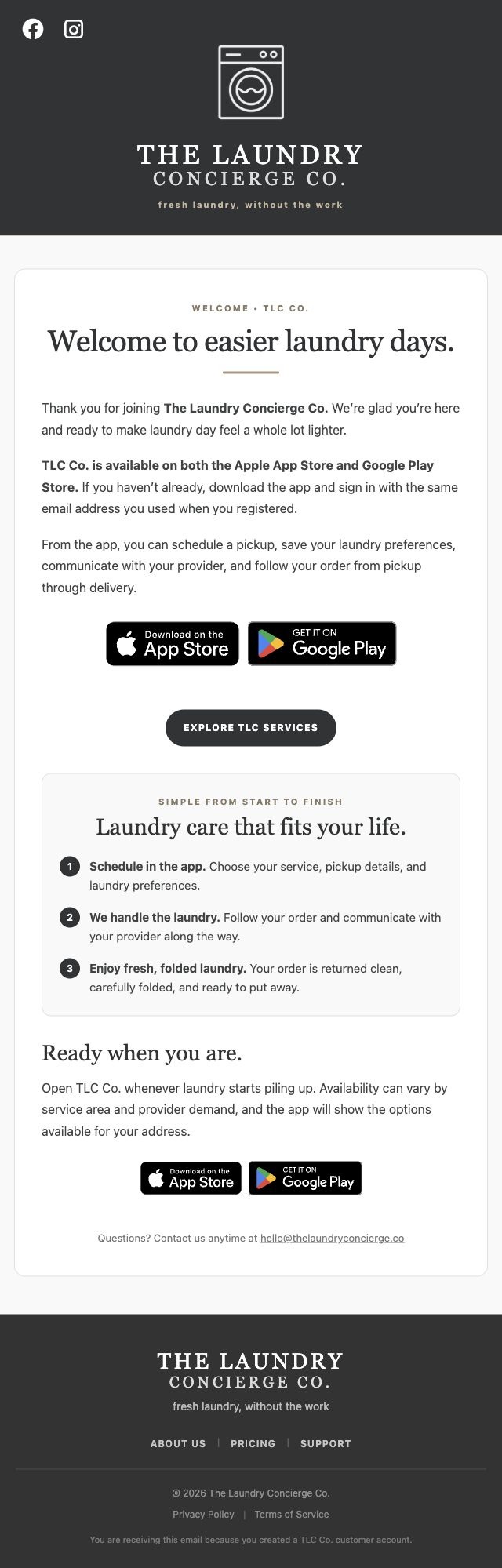
Scroll inside to read the full email
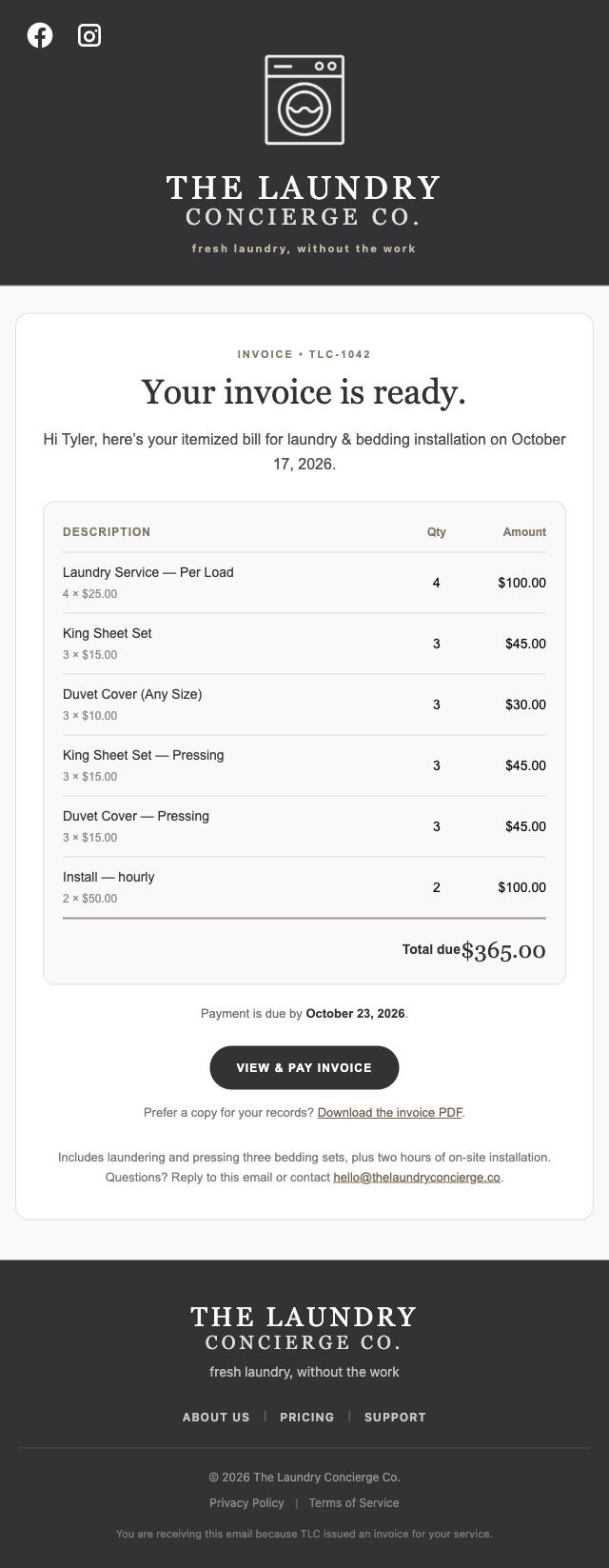
Scroll inside to read the full email
Custom invoices in TLC Grow combine laundry, bedding care, and hourly work for in-home and install jobs.
Choose services, set quantities, and add custom charges in TLC Grow. Stripe hosts payment, and Resend delivers the branded email with a PDF. Delivery events feed back into the invoice record.
Existing TLC email templates · sample invoice details
Three role-specific apps share the records behind each order. I connected the customer journey, provider workflow, and operations tools.
TLC Co.Book & trackTLC ProsFulfill & deliverTLC GrowOversee & resolveShared information. Different workflows and permissions.
Customers, providers, and administrators need different tools, but they’re working on the same service. I connected the booking, fulfillment, conversation, pricing, and operations workflows around shared records.
Conceptual architecture based on the TLC apps and shared Supabase order/pricing workflows. The website adds discovery, signup, scheduling, and support. This diagram simplifies the system; it is not a claim that every client receives every update instantly.
Saved amounts, permission checks, and recovery for uncertain responses. I built the safeguards around Stripe payments and provider payouts.
Unknown outcome? Check the recorded result before trying again.
Provider transfers and bank payouts are tracked as separate stages.
I built the checks around payment and payout actions: saved amounts, current permissions, valid financial states, and recovery when a response is uncertain. A retry should start by finding out what already happened.
The September payment work recorded 32 mocked handler tests covering permission, stale writes, failed saves, authorization/capture errors, and retries. October Grow finance work recorded 18 backend tests for server-owned reviews, expiry, duplicate confirmation, destination changes, and unknown outcomes. Backend deployment is documented; these checks did not send a real instant payout or charge a live card.
Order history and proof photos are restricted to the customer, eligible assigned Pro, or an administrator. The server enforces the rule.
Grow’s finance actions also require a current admin check. Stripe secrets stay on the server.
A hidden button is not an access rule. For order history and proof photos, I restricted access to the order’s customer, eligible assigned provider, or an administrator—and checked unrelated and signed-out cases.
October 8 deployed database checks verified participant/admin reads and unrelated/signed-out denial for the scoped history endpoint and proof-photo policies. All existing proof objects and status events were retained. Actual signed-JWT file transfer was a separate acceptance step. These are specific implemented controls, not a whole-system security certification.
Current rates flow from Stripe to the apps and website. Accepted orders keep their saved prices.
existing orders checked.
No prior item prices or totals changed.
I connected Stripe’s current prices to the shared catalog used by the apps and website. New orders use updated rates; accepted orders keep their saved prices. Invalid catalog changes stop before publication.
October 15–16 records cover service-only publication, single-use claims, duplicate/invalid price rejection, atomic updates, and configuration conflicts. All 44 existing orders retained prior item prices and totals; six unfinished orders gained only missing optional items. A new optional item does not itself charge a customer.
Approved guidance, current pricing, and limited profile context. When a question falls outside those boundaries, Ask TLC points to the app or human help.
Answer from available facts.
Open the app or contact support.
I connected the assistant to approved guidance and current pricing, with narrowly scoped profile context. If facts are unavailable or the request needs detailed account access, it gives an honest fallback or a path to human help.
Consumer Ask TLC launch scope is guidance plus the caller’s own permitted profile facts. Detailed orders, jobs, and payments are excluded; Grow’s admin assistant has a separate scope. October launch/pricing regressions cover authorization and unavailable pricing. Signed-in end-to-end acceptance is distinct from backend tests.
Recorded order events appear beside messages without creating fake chat. Push alerts have their own routing and delivery checks.
Keep the recorded timestamp.
Read existing events; don’t insert fake chat messages.
Route iOS devices and share a signed push credential within a batch.
Push gateway acceptance is recorded separately from receipt on a phone.
Order activity belongs beside customer and provider messages. I projected recorded status events into the conversation without inflating unread counts, and separately improved iOS push routing and credential reuse.
The October status reader preserves recorded timestamps, checks order membership, supports paging, inserts no chat records, and sends no extra push. The September iOS notification repair reused APNs credentials within a worker and shared concurrent refreshes. A targeted sandbox push was accepted by Apple; actual phone receipt remained a separate check.
SwiftUI · Kotlin · Next.js · Supabase · Stripe · Cloudflare · Resend

Find when friends are free, make a plan, and work out the details together.
Product design · Flutter / Dart · Supabase data & permissions · Beta testing
A shared view of everyone’s week, with opportunity cards that turn overlapping free time into a reason to get together.
How it worksOne-off time blocks and recurring availability.
Compare friends and selected Circles.
Turn an available window into a plan.
Real app UI and profile photos. Availability and opportunities are illustrative.
The date, place, people, and discussion stay together. My Dinner plan below is captured from the hosted beta.
Behind the cover photoOne roster separates the organizer, confirmed guests, maybes, and people who haven’t replied.
Bring friends into the plan and review invite requests.
Open the discussion from the same plan.
A familiar group for more than one event. Circles bring member statuses, a shared conversation, and the next plan into one place.
How it worksA persistent group and shared thread.
Member statuses beside real profile photos.
Move from the group into planning.
Current Flutter screens with illustrative Circle statuses and plans.
Coordinate a ride and split dinner costs in the same thread. Cards remain actionable as the conversation moves on.
How it worksReal app UI with illustrative messages and tools. Shared expenses track paid / owed; they do not process payments.
Let the group choose. Votes, options, and results belong to the plan instead of getting lost in messages.
How it worksReal app UI with locally seeded poll results, list items, and messages.
Keep the practical details together: what to bring, who’s handling it, and what still needs doing.
How it worksReal app UI with locally seeded poll results, list items, and messages.
Shared availability becomes opportunity cards showing who could meet, and when.
Illustrative times. The app compares actual shared time windows.
I built the Board around weekly rules, date-specific time blocks, and plan windows. The overlap calculation compares time-zone-aware intervals and distinguishes clear opportunities from less certain ones. Only accessible, selected friends’ Boards enter the comparison; an opportunity is a suggestion, not a booking.
Circles give a recurring group its own members, shared plans, and conversation.
One familiar group for the next plan.
Members can request an invitation for an eligible friend; the organizer reviews it. Server-side checks verify current membership, ownership, friendship, and blocks before accepting the action. Circle-based availability sharing is a separate permission, not automatic access to someone’s whole Board.
Ride cards connect a friendly interface to participant checks and capacity rules.
2 accepted · 1 available
Illustrative ride offer. The server serializes acceptance on the ride record.
These are structured records attached to the discussion, so a ride request or expense stays actionable after newer messages arrive. Ride acceptance checks available seats and plan membership. Expense cards track who owes and who has paid; they do not move money. Tasks, lists, and coordination items can be completed and reopened.
Current status and full-Board access are separate choices, with controls for people and Circles.
Blocks and “Hide all” take priority.
Joining a group doesn’t bypass those choices.
I separated the social signal from access to the full schedule. The source includes row-level security, recipient-specific availability resolution, Circle grants, exclusions, blocks, and a “preview as this person” view. Related SQL and widget tests cover those boundaries.
A message appears immediately, then reconciles with the server’s saved version.
Remove the pending bubble and restore the text for another try.
Plan discussion sends use a client operation ID to reconcile the optimistic bubble with the saved record. A failed send restores the draft and reply context. Realtime listeners refresh messages, reactions, polls, coordination items, and logistics; older message pages are merged without adding records already present.
Direct and Circle chats also retain the operation ID for retrying the same failed send. Plan messages also have a database uniqueness constraint on sender and operation ID.
Plan covers retain their source photo separately from the display crop.
Staged uploads are removed if saving fails.
Private storage, permissioned reads.
Cover access is limited to the owner and plan participants.
The editor keeps the original source bytes and the display crop separately, so opening the crop editor again does not repeatedly crop an already cropped image. Saving handles upload cleanup on failure. The plan-covers bucket is private, with owner-scoped upload rules and participant-aware reads.
These describe the implementation. Storage rules and device behavior have their own acceptance checks.
Mobile & web · Currently in closed beta
Flutter / Dart · SupabaseTHE PERSON BEHIND THE PRODUCTS
Before I was building apps, I was building things by hand, working with customers, and making music. A longtime interest in technology gave those experiences another outlet.
More about my background ↗Years in construction, manual labor, and customer service taught me to follow through, adapt when plans change, and build around the needs of the person doing the work.
A life in music taught me to think in patterns, explore abstract ideas, and refine the details. I bring that same attention to the flow and feel of an app.
I’ve always wanted to understand how things work. Creating and following systems turned that curiosity into a habit: break down a problem, make the next step clear, and keep improving it.
Those habits carry into my development process. I use an AI-assisted workflow, with hands-on ownership of product decisions, design, integrations, testing, and releases. Project records keep the reasoning, security work, and verification alongside the code.
Requirements, decisions, dependencies, and to-dos stay connected in each app’s HQ.
Scope · tasks · acceptance criteriaDocument access rules, track findings and fixes, and record why a feature changed.
Permissions · feature updates · open risksKeep test evidence and release notes with the work, including what still needs checking.
Results · release records · follow-upsAutomated unit and UI suites cover calculations, state changes, and layout regressions.
Availability overlap · pricing rulesRole and database-policy checks, denied access, retries, and recovery paths.
Sharing boundaries · failed sendsBrowser and simulator checks for real journeys, screen sizes, navigation, and readability.
Small screens · order flows · chatI record what was checked, where it ran, and what still needs verification. Device acceptance and a live release have their own evidence; security and feature updates keep their follow-up tasks attached.